
What Are Impressions on LinkedIn? A Comprehensive Guide to LinkedIn Impressions
Introduction
LinkedIn is a powerful tool for professional networking and career growth. It provides various metrics to help users optimize their profiles and content. Understanding these metrics is key to making the most of LinkedIn. One important metric is impressions. In this guide, we will explain what impressions are on LinkedIn, why they matter, and how to improve them.
What Are Impressions on LinkedIn?
Defining Impressions in the Context of LinkedIn
Impressions on LinkedIn show how many times your content—like posts, articles, or ads—appears on someone’s screen. It doesn’t mean they interacted with it, just that they saw it.
Impressions vs. Views and Engagements
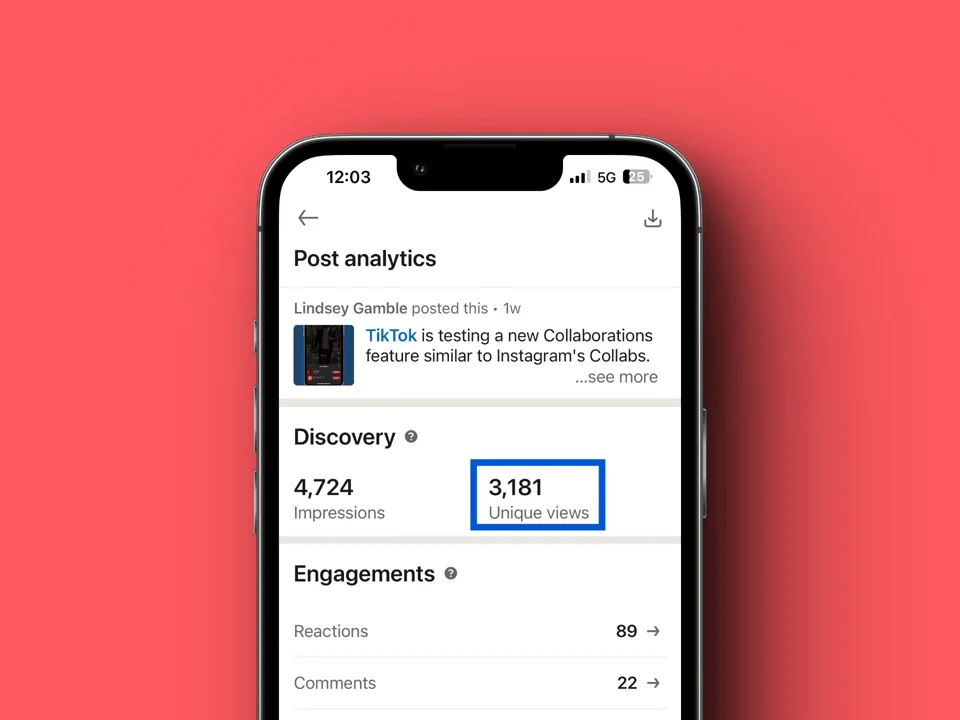
It’s important to know the difference between impressions, views, and engagements. Impressions show how often your content is displayed. Views count the number of unique users who see your content. Engagements track actions like likes, comments, and shares. Knowing this helps you understand your content’s reach and impact.
Understanding LinkedIn Impressions
What Counts as an Impression on LinkedIn?
An impression is counted each time your content shows up on a user’s feed. Even if they just scroll past it without clicking, it still counts as an impression.
Criteria for Measuring Impressions
LinkedIn’s algorithm measures impressions based on how visible your content is. Factors like your network size, user activity, and content relevance affect how often your posts are shown, impacting your impressions count.
Decoding LinkedIn’s Impressions Algorithm
How LinkedIn Tracks Impressions
LinkedIn uses an algorithm to track impressions. It looks at factors like how much time users spend on LinkedIn, what they interact with, and how relevant your content is. The more relevant and engaging your content, the more impressions it will get.
Factors Influencing Impressions
Key factors influencing impressions include:
- Reach: The size of your network and number of followers.
- Visibility: How often your content is shared and engaged with.
- Content Quality: Interesting and relevant content gets more impressions.
The Importance of Impressions on LinkedIn
Why Impressions Matter
Impressions are important because they show how widely your content is being shared. High impressions mean more people are seeing your content, which can help build your presence on LinkedIn. For businesses and professionals, this can lead to more connections and opportunities.
Linking Impressions to Marketing Goals
For marketers, impressions are linked to goals like brand awareness and lead generation. By maximizing impressions, you reach a wider audience, which can drive more traffic to your profile or website and increase the chances of conversions.
How to Increase Impressions on LinkedIn
Practical Tips for Boosting Impressions
Here are some ways to increase your impressions:
- Create Engaging Content: Share posts that are interesting and valuable to your audience.
- Optimal Posting Times: Post when your audience is most active. LinkedIn analytics can help you find the best times to post.
- Use Hashtags: Add relevant hashtags to make your posts more discoverable.
- Engage with Your Network: Like, comment, and share posts from your connections to boost engagement.
Case Studies and Examples
Consider a professional who regularly shares industry insights and engages with their network. Their posts, with relevant hashtags and posted at peak times, get more impressions than sporadic, generic content.
Analyzing LinkedIn Impressions for Better Engagement
Interpreting Impression Data
LinkedIn Analytics provides insights into how your content performs. By looking at this data, you can see which posts get the most impressions and engagements. This helps you improve your content strategy.
Visual Aids for Data Analysis
Use charts and graphs to visualize impression data. Tracking performance over time can reveal patterns and help you identify the best times and types of content to post.
Common Mistakes That Can Decrease LinkedIn Impressions
Pitfalls to Avoid
Here are some common mistakes that can lower impressions:
- Inconsistent Posting: Not posting regularly can reduce visibility and impressions.
- Lack of Engagement: Not interacting with your network can lower your content’s reach.
- Ignoring Analytics: Not analyzing performance data can prevent you from improving your strategy.
Tips for Optimization
To maximize impressions, post consistently, engage with your network, and review analytics regularly to adjust your strategy.
User Stories and Success Anecdotes
Real-Life Success Stories
Hearing from users who have successfully increased their impressions can be inspiring. For example, a marketing professional who regularly posts insightful content and engages with their network might share how their impressions tripled within a few months, leading to significant career opportunities.
Lessons and Takeaways
These stories offer valuable lessons: consistent posting, engaging content, and active networking are key to boosting impressions and achieving professional growth on LinkedIn.
Conclusion
Understanding and optimizing LinkedIn impressions is vital for enhancing your presence on the platform. By leveraging the insights and strategies discussed in this guide, you can increase your visibility, engage more effectively with your network, and achieve your professional and marketing goals. For those seeking expert help, consider partnering with the best digital marketing agency in Dubai to maximize your LinkedIn strategy.
FAQs
What are impressions on LinkedIn?
Impressions refer to the number of times your content appears on a user’s screen on LinkedIn.
What is an impression on LinkedIn?
An impression is counted each time your content is shown to a user, regardless of whether they interact with it.
What do impressions mean on LinkedIn?
Impressions measure the visibility of your content on LinkedIn, indicating how widely it is being distributed.
How often should I post to increase impressions on LinkedIn?
Posting consistently, ideally several times a week, can help increase your impressions.
Does LinkedIn Premium impact my impressions?
LinkedIn Premium can enhance visibility through features like InMail and profile visibility, potentially increasing impressions.
How can I track the performance of my LinkedIn posts?
LinkedIn Analytics provides detailed data on post performance, including impressions, engagements, and other key metrics.